From 0 to 50,000 Monthly Page Views: 12 Principles I Worked Out as a Blogging Newbie

I’m a complete novice at online content creation, but I grew my travel blog, One Small Bag, from nothing to over 50,000 monthly page views in under a year. While the past isn’t a guarantee of the future, I wanted to share my story in the hope it might help someone else just starting, as I was a year ago. I have no course to sell or secret formula to promote, just an infrequent newsletter I’d love you to join. I’ve also added my mostly free tech stack at the end, with a couple of affiliate links, because I know how stuck I got on these decisions when I started. Full disclosure.
WordPress may have been a mystery to me a few short months ago, but what I bring is 30 years of experience building corporate finance and logistics systems. System architecture, logical data flows, usability, and respect for human intelligence – these are my jam, along with more than the average dose of healthy skepticism. And I’m not a natural writer either; I applied my experience of building and troubleshooting hundreds of business systems to setting up and writing a blog.
I can’t isolate the effect of every decision I’ve made, or claim that any single tactic caused the growth. Search is complicated, and my traffic has fluctuated. But I can share figures straight from my analytics, how I approached things, what I prioritised, what I chose to ignore, and what I’d do differently if I were starting again.
This guide may include a few affiliate links. If you choose to buy something through one of them, I may earn a small commission (at no cost to you). Thank you for supporting One Small Bag.
The One Small Bag Analytics
Here are my figures, pulled straight from Google Analytics. I built my blog on a whim 2 years ago, wrote 4 posts, gave up and left it for a year. Then I picked it up again, redesigned everything from scratch, and started ramping up content in October 2025. I still don’t have that many posts – around 70. My views are widely spread, with almost all posts contributing to some degree, but my post on tiny travel essentials is my highest performer, bringing in around 10% of my views.
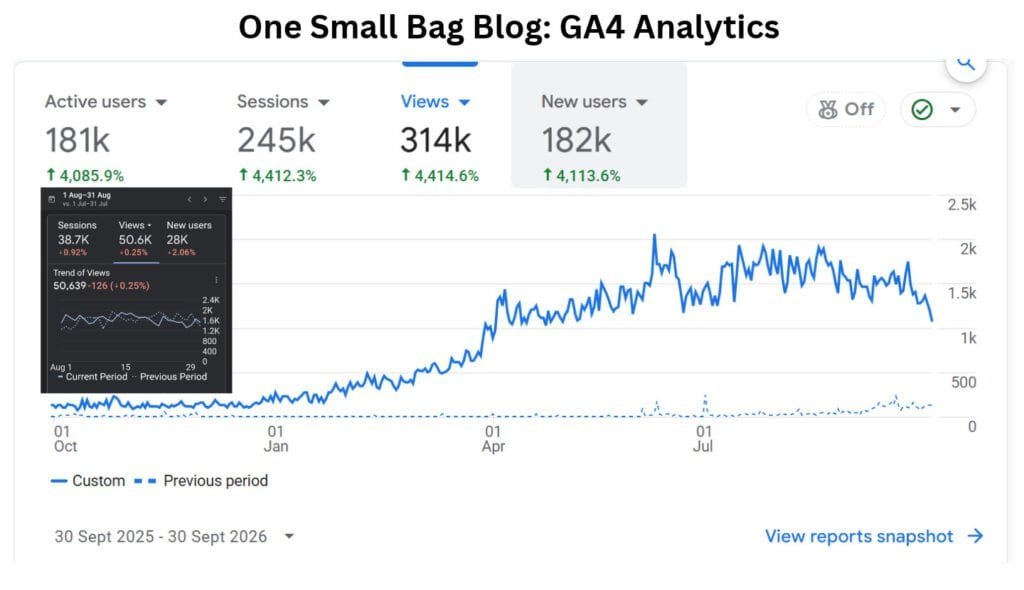
The graphs show my views stayed low until January 2026, then started to build and hit 50,000 page views in August 2026. They also show my traffic growth dipped at the end of September. Google Trends indicates my travel content niche is highly seasonal, so substantial autumn dips are expected, and that’s what’s happened. I also slowed my posting pace over the summer, which didn’t help either.
Now I’m rolling out Phase 2, adding more traffic sources and building in more resilience to put me in a stronger position for my second year. Of course, being a ‘one-trick pony’ and relying almost exclusively on search to build my traffic was never a sensible strategy, but I mean it when I say it. I started out knowing nothing. I didn’t have the capacity to do much more without spreading myself too thinly. There’s still much to do, and I’m still learning.
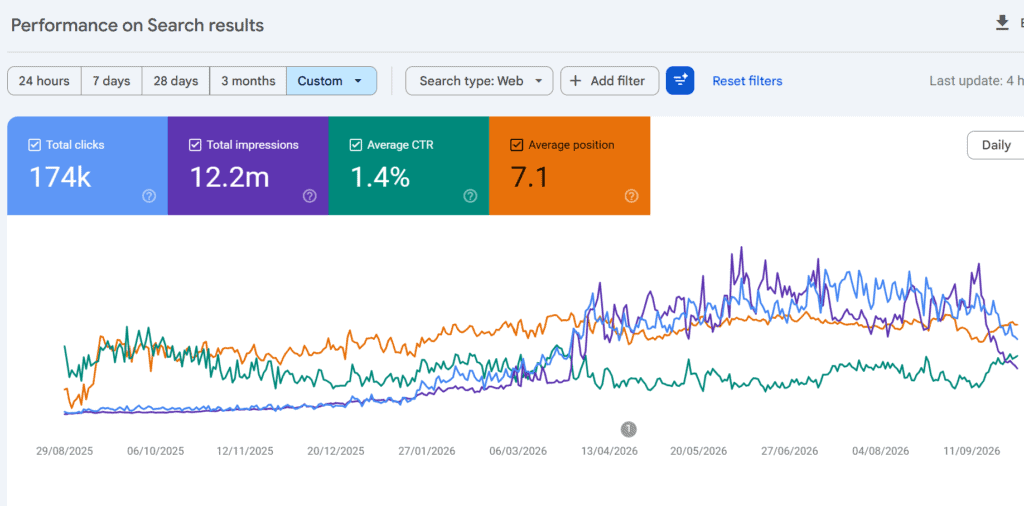
Raw views tell only part of the story. So I’ve added the Search Console results for more insight. Over the period shown, my site received 174,000 clicks from Google Search, from 12.2 million impressions, but growth wasn’t immediate or linear. This is my reading of it:
- Search picked up in April 2026; my Moldova content had already started ranking, as I hoped, given the lack of competition. The breakout post was my Chisinau-to-Bucharest sleeper train article. It still performs well, but it now accounts for a small share of my overall traffic as other posts have increasingly contributed. This post provides a neat bridge between my Moldova content, which is relatively easy to rank for, and my Romania content, which is a little more difficult. Strong internal linking within content clusters has boosted overall views, far beyond what I could have achieved from search alone.
- Impressions and views dipped in September. My travel content is seasonal, and I’ve also noticed more AI overviews answering questions directly, while rankings have remained relatively stable. Rather than assume a single cause, I’ll keep monitoring performance and look at the affected pages and queries.
- My average ranking position has been around 7 since my posts started ranking. That doesn’t sound bad to me for a newbie, but I recognise I chose less competitive areas, especially when I started. I also write long-form content that answers multiple long-tail queries.
- My Click-through rate is 1.4% over the last year. There’s definitely room for improvement here. I need to see if some pages could attract more clicks, especially those with plenty of impressions, so that’s an area I should definitely work on.
12 Things I learned to grow my blog to 50,000 views in a year
Looking back at the last year, this is what I learned. These aren’t universal rules, and I don’t claim to have uncovered the secret sauce. Some of it will be familiar to experienced Search Engine Optimisation experts (SEOs), and some of it reflects choices I’ve made differently. I’m sharing what I’ve learned, not suggesting there’s only one way to do it. So let’s get started:
1. The Internet Is Full: Write What’s Missing
This might be hard to hear, but the world may not need another “3 Days in Paris” article unless you have an extraordinary angle or deep personal expertise. If you’re starting, consider the unsung corners that nobody else writes about. For travel, that could be your own backyard or somewhere off the beaten path. As a European travel writer, I started out writing about North Macedonia and Moldova. Low-volume topics won’t usually bring massive traffic individually, but they can be a good place to start. Competition may be lower, and it’s often easier to provide genuinely useful, specific information that existing results don’t cover well.
While I wasn’t overly ambitious out of the gate, I gradually moved across the Balkans, then into quirky countries like European microstates. Right now, some of my best-performing posts are from France, and when I started ranking for Capital Cities, I knew things were moving.
2. Use AI to Learn, Not to Write
AI has been my best tutor, but it doesn’t write my content. If an algorithm could write my articles, what would be the point of publishing them? Instead, I focus on depth, originality and whether the article genuinely answers the reader’s question.
Use AI to research, clarify technical concepts, and challenge your assumptions, but be sceptical; AI may be wrong, or it may just reflect your own ideas to you without teaching you anything.
Don’t be intimidated by more experienced creators claiming they generate published articles in two hours using automation. Real depth takes human effort. Trust your gut, take the time, and don’t let imposter syndrome get the better of you. One long-form article that answers the question properly may beat multiple superficial ones with overlapping content and built-in padding.
3. Build on Your Experience (E-E-A-T)
I don’t have a network of people handing me backlinks to promote my blog and lend it authority. What I do have is real-life experience, and Google says that matters. Experience, Expertise, Authoritativeness, and Trustworthiness (EEAT) is the term for it, and I built it in naturally before I learned about it. So if you want your content to appear in search, show you have something distinctive to offer and define your personal edge:
- Highlight your distinct perspective on your About page.
- Write about topics you really know about, places you have lived in or experienced multiple times.
- Share a style or background that differs from the typical blogger narrative.
4. Write the Articles You Wish Existed
When planning content, ask yourself: What information was missing or frustratingly hard to find when I was doing this myself? If you struggled to find a clear, comprehensive answer, chances are thousands of others are having the same issue. Fill that gap. My Balkan guides often cover logistics because accurate information can be scarce online, and AI may not answer these questions well or accurately. I’ve written articles targeting queries I see asked frequently on social media. Here’s one such example. Belgrade to Sarajevo by bus and why breaking the journey in Tuzla makes sense.
5. Design your system, don’t just write
Design logical categories and tags and build a matrix of overlapping topic clusters that interlink naturally. With every post I write, I find more connections outside the post’s home category, or a new subgroup within it, so that I can connect more dots. I believe investing heavily in internal linking has helped readers discover more of my content. It also helps search engines find and understand relationships between pages. I can’t isolate its contribution to my traffic growth, but it’s become an important part of how I organise the site. Creating systems that categorise information in multiple ways, to make it useful for the end user, has been a core part of my professional life, so this part came easily.
I’ve tried the tool LinkWhisper to help me find links in my content. Many of its AI suggestions were terrible, and unquestioningly accepting them could really mess things up, but it did find some good connections I missed when I defined rules myself. For now, I’ve decided not to renew. I still have relatively few posts, but if you have many posts with missed interlinking opportunities, LinkWhisper could add value. Just make sure you stay firmly in charge of the link building.
Structure applies within posts, not just between them. Use clear headings (H2s and H3s), a table of contents, callout boxes, and clean layouts. I’ve added jump links in my longer to-do posts, which I think has increased dwell time and that could be helping them perform better,
6. Know your audience, but don’t limit your scope
A scattergun approach to content creation is unlikely to help, and content clusters make sense for both readers and search engines. This is reflected in standard blogging advice, which tells you to “find your niche” and “niche down”. While I agree with that advice, I would caution against applying it too rigidly and strapping yourself in too tightly.
I felt blogging advice was telling me to write for my demographic. In my professional life, I’ve never let my age or gender define me, and I wasn’t about to start now!
My analytics show a wide age range, with gender fairly evenly split. And the biggest single demographic? Men under 30! I’m female, if you hadn’t figured it out, and I have a 60th Birthday coming up. At One Small Bag, everyone is welcome, and they always will be.
7. Don’t skip the technical stuff
Core Web Vitals are Google’s measures of loading performance, responsiveness and visual stability. They’re part of the broader page-experience picture, alongside many other factors that affect search visibility. Improving them benefits readers and site health, but passing the tests doesn’t guarantee better rankings.
Understanding Core Web Vitals was my steepest learning curve. I’ve had a few issues to resolve over the last year. I’ve adjusted picture placement and removed blocks I’d inserted from my theme (Kadence accordions) from above the fold on every post. I’ve tinkered with LiteSpeed Cache settings. I’ve learned to be cautious about adding plugins or scripts. If it’s not essential, I probably won’t have it. My site currently passes Core Web Vitals on both desktop and mobile, but I’ll keep monitoring.
8. Evaluate whether keyword and Seo tools are serving you or you are serving them
Search engines now understand the meaning and intent behind a query, rather than relying solely on exact keyword matches. Keyword research can still help you understand what people are looking for, but the tools aren’t equally useful for every topic, especially where search volumes are low. I’ve learned to treat their estimates as a starting point, not a set of instructions.
I’ve stopped paying for Keysearch, and I don’t feel I’ve missed it. I’m not suggesting everyone ditch their keyword search tools or that anything is inherently wrong with them, but if you’re struggling to make sense of the results, especially for low-volume topics, don’t pay for them just because.
I also use the SEO plugin RankMath (free version). While I understand it creates sitemaps, schema markup, back-end redirects, and a few other essentials, the traffic lights telling me whether my blog post is optimised don’t feel useful. Following all the suggested steps to ‘go green’ pushes you away from natural language and toward repetitive keyword use. This runs at odds with the other advice I received: keyword stuffing likely does more harm than good. All in all, ‘Search Optimisation Tool ‘ feels quite a grand term for what it is. I maybe naively expected more from it? I’m still using the plugin, but I’ve stopped playing its circular traffic light game.
9. Resist Over-Monetisation Early On
I chose not to run heavy display ad networks during my initial growth phase, and I still don’t have them. Did I leave money on the table? Maybe, but I prioritised performance and reader experience. It’s harder to say whether that helped my rankings, but it felt like the right decision for my site. As I go into year two, I’ll re-evaluate and review the best ways to monetise my blog. As for monetisation, I haven’t hit the big time yet!
10. Prioritise Original Photos
Use your own photos whenever possible, and write meaningful alt text where an image needs a text alternative. Original on-location photos can make a travel article feel more personal and distinctive than generic stock imagery. They also let readers see exactly what you experienced.
11. Master Phase 1 Before Starting Phase 2
If you try to do everything at once while learning a substantial new skill set, you’ll likely achieve nothing.
Building a blog is like building a software system: get the nuts and bolts right first, prove the process, then add the extras. Only then can you start showing it off. I didn’t worry about maintaining active social media channels or sending weekly newsletters in my first year, and I’m not beating myself up about it. For me, that would have been too much, too soon. For me, it was right to focus on site structure and content quality first. Add distribution channels when you’re ready.
12. Stay Humble and Be Useful
For me, approaching blogging is like taking on a new corporate client. Don’t expect massive rewards right out of the gate.
Quietly make yourself useful. Do the little things: take out the trash, make the coffee, be kind, be approachable, and consistently deliver value. Build a foundation so solid that your offering becomes indispensable. This approach has worked well for me professionally. I’m treating my website no differently.
The Tech Stack I actually Use
I spent far too much time trying to decide which tools to use to build my website. Beyond general points about cost, usefulness, and flexibility, it’s hard to evaluate when you don’t know the right questions, let alone understand the answers. A year later, I’m pretty happy with my pared-back stack, most of which is free. Everything is chosen with budget and future growth in mind. I’m not promising these are the right tools for everyone, but if you are dithering as I did and want some ideas, here are options worth considering.
- Blogging Platform: WordPress. – Most popular non-e-commerce platform by far. WordPress.org, not WordPress.com.
- Hosting: Hostinger – Everything works seamlessly for me without asking or being required to ‘do’ stuff. Keenly priced and 20% off with this link
- Theme: Kadence (Free Version) – Lightweight and built natively for modern site layout. Free works for me.
- SEO & Redirects: RankMath (Free Version) – A popular SEO plugin to give you sitemaps, schema markup, redirection tools and other site essentials. Don’t take its traffic light games too seriously.
- Image Optimisation: ShortPixel – Reducing image sizes can speed up page loads, especially if your content is image-heavy.
- Email List: MailerLite – For managing subscribers and newsletters (feature-rich service with first 250 subscribers free)
- Accounting: Xero – A simple accounting package to handle back-office bookkeeping cleanly from day one.
Where to Next
For me, the focus is to make progress on my content backlog and be more present for my readers, starting with a more regular newsletter. I would love it if you joined my mailing list. There is zero chance I’ll become that person who bombards you.
I also plan to secure more exclusive discounts for my readers and show up more on social media, which I haven’t done until now. I have just started posting pins on Pinterest.
I hope you enjoyed reading this. If you have any questions or comments, do let me know in the comments. Thank you for reading my blog.
Unsubscribe whenever you like (Privacy Policy)
